Seats that scale with the quantity purchased
This is a working demo for support ticket 1526650. One SureCart product, one SureMembers membership. The membership is deliberately left at Maximum Team Members = 1, exactly like your screenshot. The number of seats each buyer ends up with comes from the quantity they chose at checkout, not from that setting.
1. Live results from this store
Every row below is a real test purchase made on this site, and the membership setting is 1 for all of them.
| Team owner | Licences held in SureCart | Seats in SureMembers | Result |
|---|---|---|---|
| Owner Seat Buyer | 3 | 2 | Manager rule: 3 licences = 2 invitable seats + the manager |
| Cleanup Demo 2 | none | 1 | Created by hand, no purchase behind it |
| Upgrade Buyer | 6 | 6 | Seats match the licences |
| Split Buy Buyer | 3 | 3 | Seats match the licences |
| WPCode Route Buyer | 6 | 6 | Seats match the licences |
| Discount Test Buyer | 12 | 12 | Seats match the licences |
| Malkav V | 7 | 7 | Seats match the licences |
| Sum Test Buyer | 9 | 9 | Seats match the licences |
| Five Seat Buyer | 7 | 7 | Seats match the licences |
| Twenty Seven Buyer | 27 | 27 | Seats match the licences |
| Twelve Seat Buyer | 12 | 12 | Seats match the licences |
| Fixed Seven Buyer | 20 | 20 | Seats match the licences |
| Repro Buyer | 12 | 1 | Seats do NOT match (SureMembers on its own) |
The row in red, Repro Buyer, was bought before the snippet was switched on: 12 licences, 1 seat. That is exactly the behaviour you reported. Every green row was bought with the snippet active.
2. Try it yourself
The store is in test mode, so no card is needed. Pick a quantity, use any email address you like, choose Test Processor and press Purchase. You can also type any quantity straight into the order summary on the checkout page.
Come back to this page and refresh. Your new buyer appears in the table above with the matching number of seats. Buy twice with the same email address and the two quantities are added together, so 9 plus 4 becomes 13 seats.
3. See it the way your customer sees it
Several buyer accounts are already set up. Log in as any of them and open Manage Your Team, which is the same screen as your first screenshot. Use the buyer name from the table above as the username. The shared password is in our reply on the ticket.
- Repro Buyer bought 12 before the fix and sees 0 / 1 members. This is the problem you reported.
- Twelve Seat Buyer bought 12 after the fix and sees 1 / 12 members, because we already added a team member to prove the seats are usable.
- Fixed Seven Buyer bought 7, then the subscription quantity was raised to 20, and now sees 0 / 20 members.
- Sum Test Buyer bought 9, then bought 4 more, went to 13 seats, then the second purchase was cancelled and the team dropped back to 9.
The login page is https://sure.ivacode.com/wp-login.php.
4. What is actually happening
SureMembers creates the team account when the membership is granted and seeds it with the seat number configured on the membership. A small snippet then reads the quantity from the SureCart purchase and writes it onto that one buyer’s team account. Nothing else changes: the membership setting stays at 1, and every other buyer keeps their own number.
Nothing here touches pricing. It runs after the order is complete, so a volume discount built with Dynamic Pricing, tiered prices or a coupon carries on working exactly as before.
5. The seats are real, not just a number
Logged in as Twelve Seat Buyer we added a team member from the Manage Your Team screen. The counter moved to 1 / 12 members and that person was granted the membership. SureMembers enforces the number stored on the team account, so raising it really does hand the buyer more usable seats.
6. Nobody can give themselves extra seats
The seat number lives on the server, and the buyer has no way to change it. We tested this by logging in as a team owner and calling SureMembers’ own endpoints directly from the browser:
- Asking the admin endpoint for 999 seats came back 403 Forbidden. Seat changes are reserved for administrators.
- Passing a seat number to the endpoints the team owner is allowed to call changed nothing. Those endpoints only add, remove and list members.
- Filling a 1 seat team and then adding one more member was refused with “Your team is full. Remove a member or upgrade your plan to add more.”
- The invite link also stops working once the team is full, so a buyer cannot get around the limit by sharing it.
The only ways the number goes up are buying more licences, raising the quantity on the existing subscription, or an administrator changing it by hand.
7. Volume discounts work at the same time
This store now has two SureCart Dynamic Pricing rules on the same product: 10 percent off for 5 to 9 licences and 20 percent off for 10 or more. The seat logic runs after the order is complete, so the two never interfere. At $10 per licence per month:
| Quantity | Full price | Charged | Seats granted |
|---|---|---|---|
| 3 | $30 | $30 (no discount) | 3 |
| 7 | $70 | $63 (10 percent off) | 7 |
| 12 | $120 | $96 (20 percent off) | 12 |
| 27 | $270 | $216 (20 percent off) | 27 |
A real purchase at quantity 12 was charged $96 and produced 12 seats. Use the buttons above to check any of these yourself; the discount appears on the line item in the order summary before you pay.
One thing to watch. SureCart’s default setting for overlapping line item discounts is All, which means every matching rule is applied and they stack. A “5 or more” rule and a “10 or more” rule would both fire at quantity 12. The two rules here avoid that by being written as 5 to 9 and 10 or more, so only one can ever match. The alternative is to go to SureCart, Settings, Dynamic Pricing, find the Line Item section and set the discount behaviour to Largest, which applies only the biggest matching discount.
8. What was tested
- New purchases at quantity 5, 6, 7, 9, 12 and 27 all produced a matching seat count.
- Raising an existing subscription from 7 to 20 moved that team to 20 seats.
- A second purchase by the same buyer adds to the first (9 plus 4 becomes 13), and cancelling it takes those seats back (13 back to 9).
- Editing the membership’s own “Maximum Team Members” resets every team on that membership in stock SureMembers. Each customer’s own number is restored straight afterwards, on both the “first save” and the “edit” paths.
- Adding a real team member moved a team to 1 / 12, so the seats are usable rather than cosmetic.
9. The snippet
This is the exact code running on this site. It needs SureMembers Pro 3.1.0 or newer, which is the version that introduced Team Accounts. On anything older the class it writes to does not exist and the snippet quietly does nothing. Add it with a code snippet plugin (WPCodeBox, WPCode, Code Snippets) or as a small mu-plugin, and change nothing else.
<?php
/**
 * SureCart purchase quantity  ->  SureMembers Team Account seats.
 *
 * Out of the box the SureMembers integration only asks "did this person buy the
 * product?" and grants the membership. The team account it creates is seeded with
 * the seat number configured on the membership, so buying 12 licences still gives
 * 1 seat. This snippet reads the quantity off the SureCart purchase and writes it
 * onto that customer's team account, so 12 licences = 12 seats.
 *
 * Seats are tracked per purchase and added together, so a customer who buys 12 and
 * later tops up with 5 more ends on 17 seats, and loses them again if a purchase is
 * refunded or the subscription ends.
 */

if ( ! function_exists( 'scsm_seats_provider' ) ) {

	/**
	 * The provider slug the SureMembers integration registers with SureCart.
	 */
	function scsm_seats_provider() {
		return 'suremembers/manage-access-groups';
	}

	/**
	 * How many team seats one purchased quantity is worth.
	 *
	 * In SureMembers the team owner does NOT consume a seat, so quantity 12 gives
	 * the buyer 12 seats to hand out. If you would rather the buyer count as one
	 * of the licences they paid for, return $quantity - 1 instead.
	 */
	function scsm_seats_for_quantity( $quantity, $purchase = null ) {
		$quantity = max( 1, (int) $quantity );

		return max( 1, (int) apply_filters( 'scsm_seats_for_quantity', $quantity, $purchase ) );
	}

	/**
	 * User meta key holding a customer's seat entitlement for one membership.
	 */
	function scsm_seats_meta_key( $access_group_id ) {
		return 'scsm_seats_' . (int) $access_group_id;
	}

	/**
	 * The customer's seat entitlement for one membership, as purchase id => seats.
	 */
	function scsm_seats_map( $user_id, $access_group_id ) {
		$raw = get_user_meta( (int) $user_id, scsm_seats_meta_key( $access_group_id ), true );

		if ( is_array( $raw ) ) {
			return $raw;
		}

		// A plain number is an entitlement stored by an earlier version of this snippet.
		if ( '' !== $raw && (int) $raw > 0 ) {
			return [ 'legacy' => (int) $raw ];
		}

		return [];
	}

	/**
	 * Total seats a customer is entitled to for one membership.
	 */
	function scsm_seats_total( $map ) {
		$total = 0;
		foreach ( (array) $map as $seats ) {
			$total += absint( $seats );
		}

		return $total;
	}

	/**
	 * The SureMembers memberships (access groups) connected to a purchase.
	 */
	function scsm_seats_groups_for_purchase( $purchase ) {
		if ( ! class_exists( '\SureCart\Models\Integration' ) ) {
			return [];
		}

		$product_id = $purchase->product_id ?? null;
		if ( empty( $product_id ) ) {
			return [];
		}

		$rows = (array) \SureCart\Models\Integration::where( 'model_id', $product_id )
			->andWhere( 'provider', scsm_seats_provider() )
			->get();

		$price_id   = $purchase->price->id ?? $purchase->price ?? null;
		$variant_id = $purchase->variant->id ?? $purchase->variant ?? null;

		$group_ids = [];
		foreach ( $rows as $row ) {
			// Honour integrations that are pinned to one price or one variant.
			if ( ! empty( $row->price_id ) && $row->price_id !== $price_id ) {
				continue;
			}
			if ( ! empty( $row->variant_id ) && $row->variant_id !== $variant_id ) {
				continue;
			}
			$group_ids[] = (int) $row->integration_id;
		}

		return array_values( array_filter( array_unique( $group_ids ) ) );
	}

	/**
	 * Write a seat limit onto one owner's team account.
	 */
	function scsm_seats_write( $user_id, $access_group_id, $seats ) {
		$repo = '\SureMembers\Modules\Corporate_Accounts\Corporate_Account_Repo';

		if ( ! class_exists( $repo )
			|| ! method_exists( $repo, 'find_by_user_and_group' )
			|| ! method_exists( $repo, 'update' ) ) {
			return;
		}

		$account = $repo::find_by_user_and_group( (int) $user_id, (int) $access_group_id );
		if ( ! is_array( $account ) || empty( $account['id'] ) ) {
			return;
		}

		if ( (int) $account['num_sub_accounts'] === (int) $seats ) {
			return;
		}

		$repo::update( (int) $account['id'], [ 'num_sub_accounts' => (int) $seats ] );
	}

	/**
	 * Record what a purchase entitles the customer to, and apply it.
	 */
	function scsm_seats_sync_purchase( $purchase ) {
		if ( empty( $purchase ) || ! is_object( $purchase ) ) {
			return;
		}
		if ( ! empty( $purchase->revoked ) ) {
			scsm_seats_drop_purchase( $purchase );
			return;
		}

		$user = method_exists( $purchase, 'getWPUser' ) ? $purchase->getWPUser() : null;
		if ( empty( $user->ID ) ) {
			return;
		}

		$purchase_id = (string) ( $purchase->id ?? '' );
		if ( '' === $purchase_id ) {
			return;
		}

		$seats = scsm_seats_for_quantity( $purchase->quantity ?? 1, $purchase );

		foreach ( scsm_seats_groups_for_purchase( $purchase ) as $access_group_id ) {
			$map = scsm_seats_map( $user->ID, $access_group_id );
			unset( $map['legacy'] );
			$map[ $purchase_id ] = $seats;

			update_user_meta( $user->ID, scsm_seats_meta_key( $access_group_id ), $map );
			scsm_seats_write( $user->ID, $access_group_id, scsm_seats_total( $map ) );
		}
	}

	/**
	 * Take a revoked purchase back out of the entitlement.
	 */
	function scsm_seats_drop_purchase( $purchase ) {
		if ( empty( $purchase ) || ! is_object( $purchase ) ) {
			return;
		}

		$user = method_exists( $purchase, 'getWPUser' ) ? $purchase->getWPUser() : null;
		if ( empty( $user->ID ) ) {
			return;
		}

		$purchase_id = (string) ( $purchase->id ?? '' );

		foreach ( scsm_seats_groups_for_purchase( $purchase ) as $access_group_id ) {
			$map = scsm_seats_map( $user->ID, $access_group_id );
			unset( $map[ $purchase_id ], $map['legacy'] );

			if ( empty( $map ) ) {
				// Nothing left to entitle them to. SureMembers deactivates the team
				// on revoke anyway, so leave the stored number alone.
				delete_user_meta( $user->ID, scsm_seats_meta_key( $access_group_id ) );
				continue;
			}

			update_user_meta( $user->ID, scsm_seats_meta_key( $access_group_id ), $map );
			scsm_seats_write( $user->ID, $access_group_id, scsm_seats_total( $map ) );
		}
	}

	/**
	 * Re-apply the recorded entitlement.
	 */
	function scsm_seats_reapply( $user_id, $access_group_id ) {
		$total = scsm_seats_total( scsm_seats_map( $user_id, $access_group_id ) );

		if ( $total > 0 ) {
			scsm_seats_write( (int) $user_id, (int) $access_group_id, $total );
		}
	}

	/**
	 * Put every customer's number back after SureMembers resets a membership.
	 *
	 * Editing "Maximum Team Members" makes SureMembers overwrite the seat limit on
	 * every team for that membership, so this runs afterwards and restores them.
	 */
	function scsm_seats_on_group_meta( $meta_id, $object_id, $meta_key ) {
		unset( $meta_id );

		if ( 'suremembers_corporate_num_sub_accounts' !== $meta_key ) {
			return;
		}

		$object_id = absint( $object_id );
		if ( ! $object_id || get_post_type( $object_id ) !== 'wsm_access_group' ) {
			return;
		}

		$repo = '\SureMembers\Modules\Corporate_Accounts\Corporate_Account_Repo';
		if ( ! class_exists( $repo ) || ! method_exists( $repo, 'get_by_group' ) ) {
			return;
		}

		foreach ( (array) $repo::get_by_group( $object_id ) as $account ) {
			scsm_seats_reapply( (int) $account['user_id'], $object_id );
		}
	}

	// SureMembers grants the membership on these events at priority 9, and the team
	// account is created inside that grant, so run afterwards. Registered with one
	// accepted argument on purpose: purchase_created arrives with one argument from
	// the checkout and two from the webhook.
	add_action( 'surecart/purchase_created', 'scsm_seats_sync_purchase', 20 );
	add_action( 'surecart/purchase_invoked', 'scsm_seats_sync_purchase', 20 );
	add_action( 'surecart/purchase_updated', 'scsm_seats_sync_purchase', 20 );
	add_action( 'surecart/purchase_revoked', 'scsm_seats_drop_purchase', 20 );

	// Renewals, reactivation, re-grants.
	add_action(
		'suremembers_after_access_granted',
		function ( $user_id, $access_group_ids, $ag_id, $send_email ) {
			unset( $access_group_ids, $send_email );
			scsm_seats_reapply( $user_id, $ag_id );
		},
		30,
		4
	);

	// A new team account for a membership we already know the entitlement for.
	add_action(
		'suremembers_corporate_account_created',
		function ( $account_id, $user_id, $access_group_id ) {
			unset( $account_id );
			scsm_seats_reapply( $user_id, $access_group_id );
		},
		20,
		3
	);

	// SureMembers listens on both of these, so we have to as well.
	add_action( 'added_post_meta', 'scsm_seats_on_group_meta', 9999, 3 );
	add_action( 'updated_post_meta', 'scsm_seats_on_group_meta', 9999, 3 );
}
- If you would rather the buyer count as one of the licences they paid for, change the
returnline inscsm_seats_for_quantity()toreturn max( 1, $quantity - 1 );. - If your snippet plugin complains about the opening
<?phpline, delete it. Some of them add it for you. - If a buyer reduces their quantity below the number of members they have already added, SureMembers lowers the allowance but does not remove anyone. The team simply shows as over its limit until the owner removes someone.
- This reads and writes SureMembers Pro internals, so treat it as custom code: try it on staging first, and re-check it after a SureMembers update.
10. How to install it, step by step
You do not need to be a developer, and you never touch a theme file. A snippet plugin does all of it through the WordPress admin, and you can switch the snippet off again with one click if you change your mind. Any of these three work: WPCode Lite (free), Code Snippets (free), or WPCodeBox (paid). The screenshots below are WPCode Lite, taken on this demo site. The snippet on this site is now running through WPCode, so what you see is exactly what you will do.
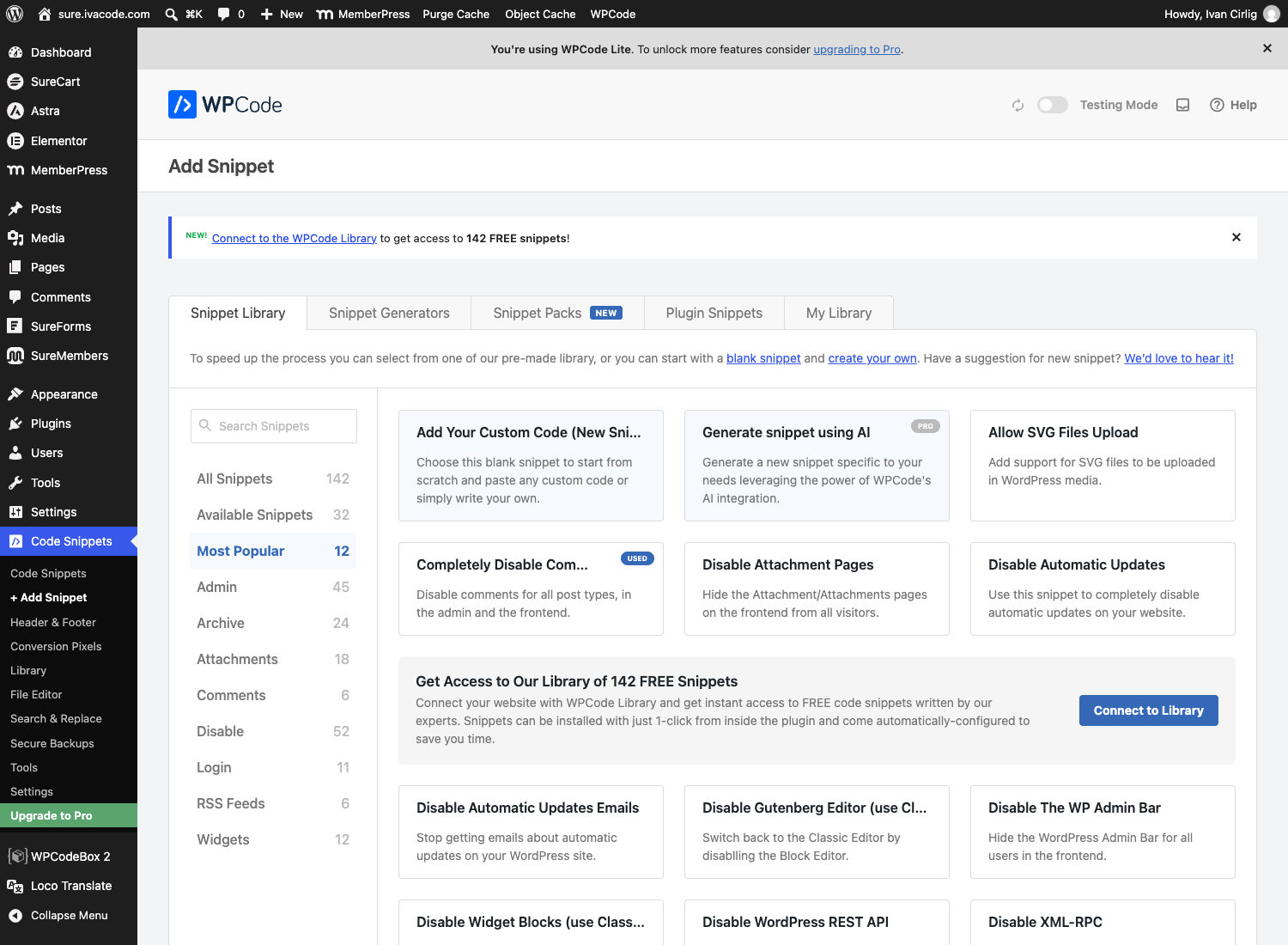
Step 1. In WordPress go to Plugins, Add New, search for WPCode, then Install and Activate. A new Code Snippets item appears in the left menu. Click + Add Snippet, then on the card called Add Your Custom Code (New Snippet) click + Add Custom Snippet.
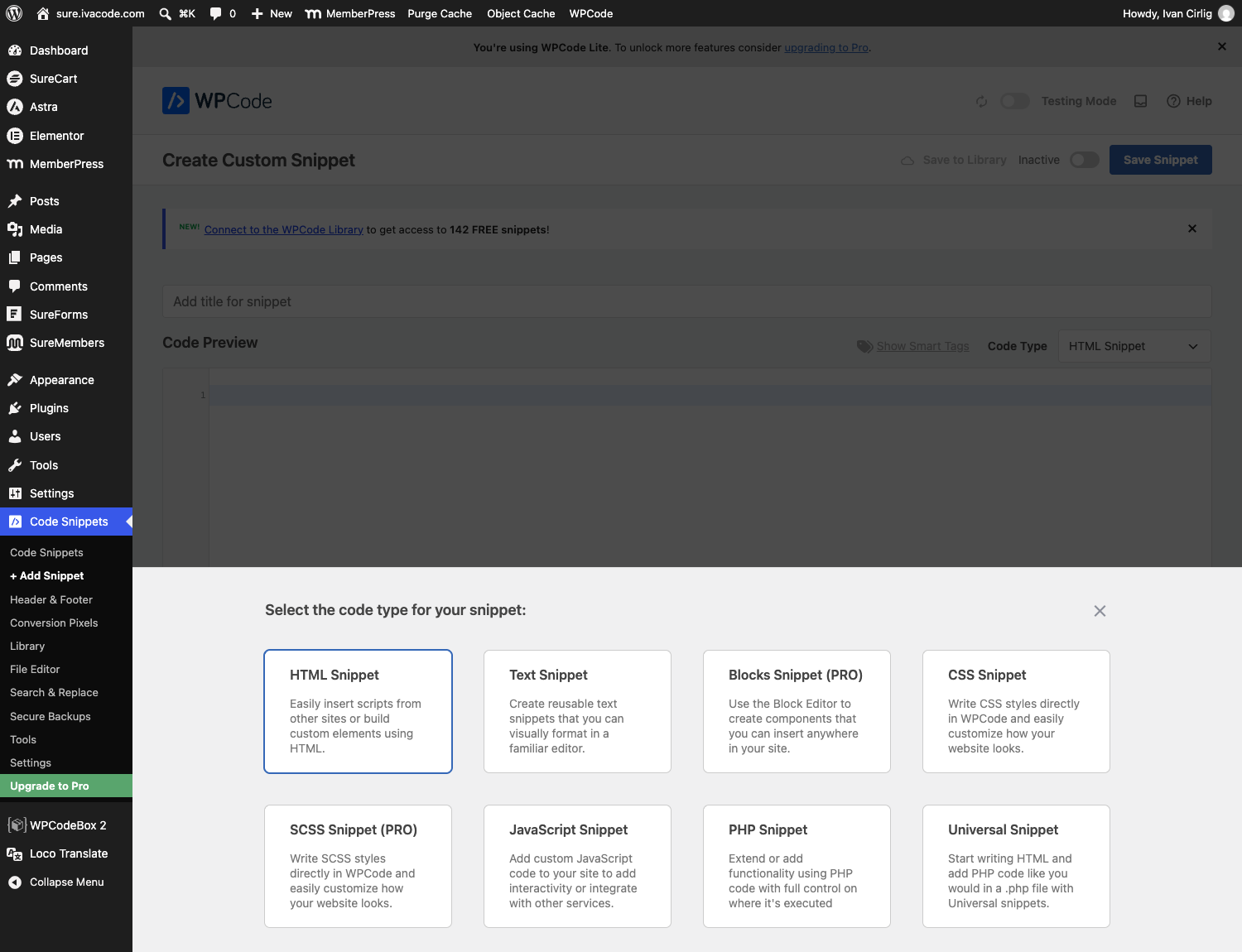
Step 2. A box asks what kind of code it is. Choose PHP Snippet.
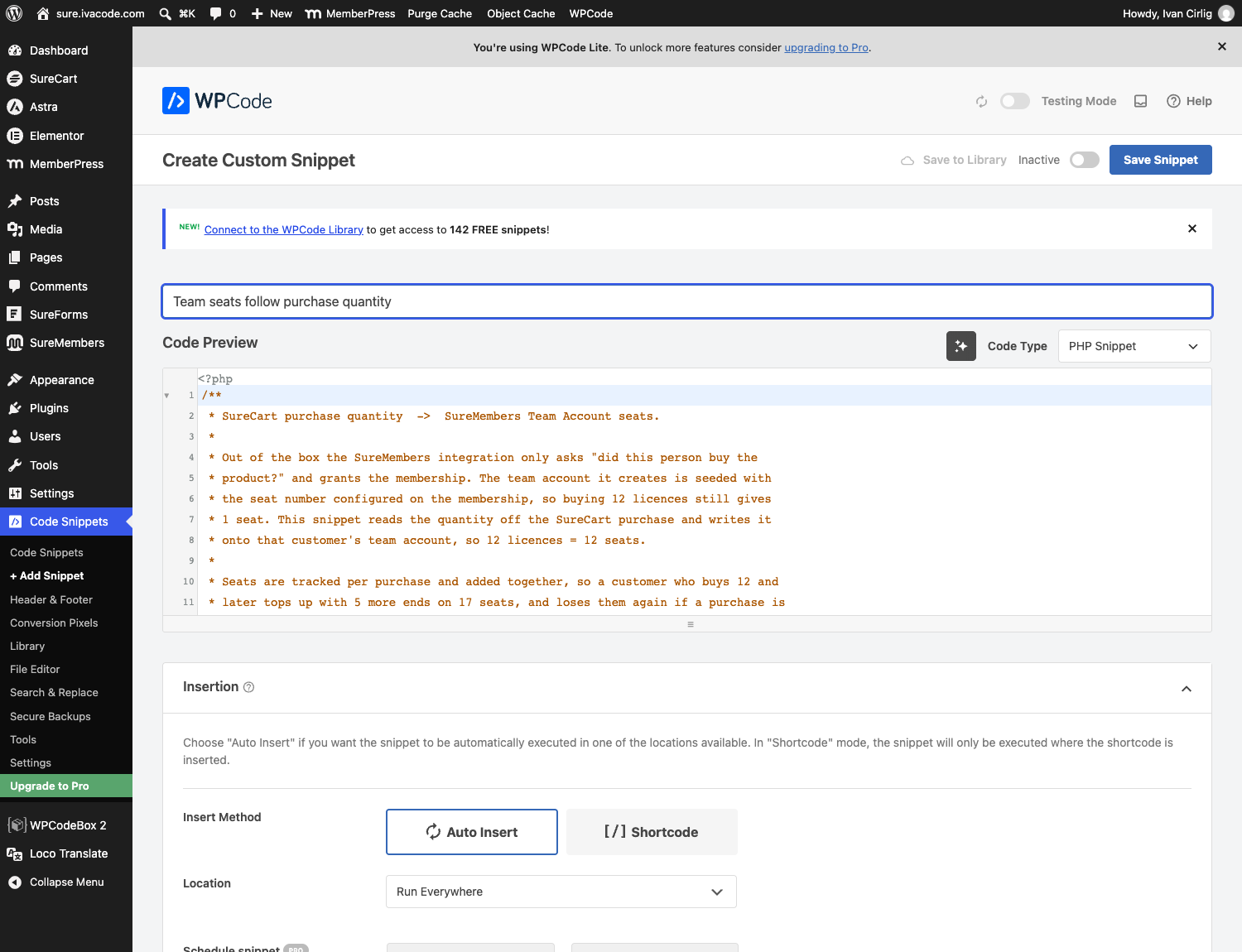
Step 3. Give it a name such as “Team seats follow purchase quantity”, then copy the code from section 9 above and paste it into the big code box. Leave out the very first line, the one that says <?php, because WPCode adds that itself; you can see it greyed out above line 1 in the picture. Below the code, leave Insert Method on Auto Insert and Location on Run Everywhere. Those are already the defaults, so normally you change nothing here.
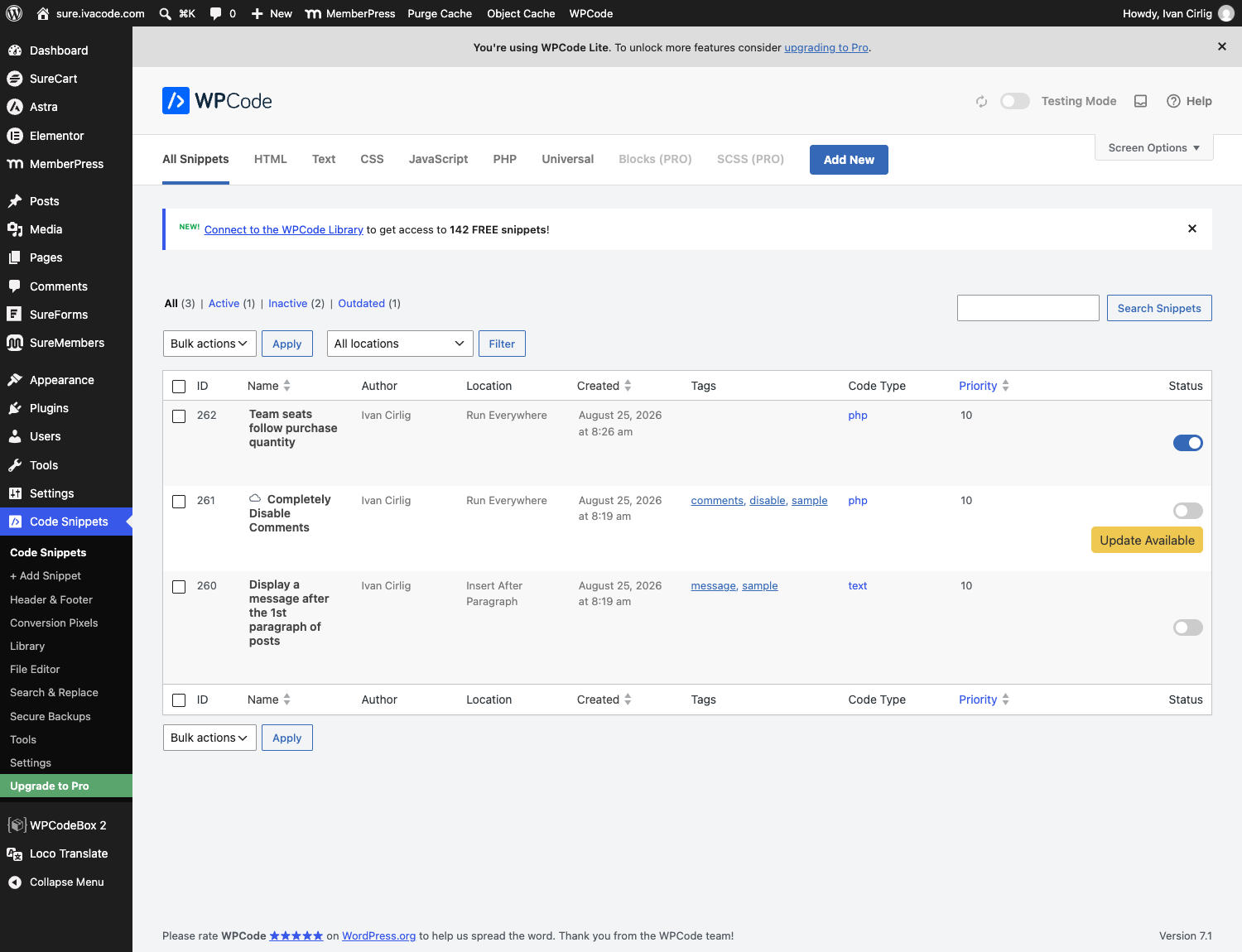
Step 4. Top right, click the switch that says Inactive so it turns blue and reads Active, then click Save Snippet. Your snippet now shows in the list with a blue switch. That switch is also your off button if you ever want to stop it.
Step 5. Test it. Put your store in test mode, buy your own product with a quantity of 3, then open the Manage Your Team page as that buyer. It should say 0 / 3 members. If it still says the old number, the snippet is not active or your SureMembers Pro is older than 3.1.0.
Do it on a staging copy first if you have one. If anything goes wrong, switching the snippet off puts everything back to how it is today; it never deletes a team or a member.
11. Two purchases of 3 are not the same as one purchase of 6
This is the point raised on 25 August. Both of the buyers below ended up with 6 licences and 6 seats. They are not paying the same amount, because a volume discount is worked out per checkout, on one line item. SureCart never looks across two separate subscriptions and adds them up.
| Buyer | What they did | Subscriptions | Charged each month | Seats |
|---|---|---|---|---|
| Split Buy Buyer | Bought 3, came back and bought 3 more | Two, of 3 each | $30 + $30 = $60 | 6 |
| Upgrade Buyer | Bought 3, then the quantity on that same subscription was raised to 6 | One, of 6 | $54 | 6 |
Both are real purchases on this store, made on 26 August, and both appear in the table in section 1. Neither of Split Buy Buyer’s two carts ever reached 5 licences, so the “5 to 9” rule never fired on either one. Upgrade Buyer’s single line item did reach 6, so it did.
To see it for yourself: buy 3 licences with the button below, then use the same button again with the same email address. Both carts will read $30. Then compare with the 6 licence button, which reads $54 in one go.
12. Where you raise the number of licences
This is done from your own WordPress admin, on the subscription itself. It is four clicks, and the volume discount is recalculated as you type.
- SureCart, Subscriptions in the left menu.
- Click the customer’s name to open the subscription.
- In the Pricing box, click Change next to the quantity.
- Type the new number. The line total and the Summary box on the right update immediately, with the discount already applied.
- Turn on Update Immediately at the top right if you want it to take effect now, then press Update Subscription. Leave it off and the button reads Schedule Update, which applies the change at the next renewal instead.
Upgrade Buyer above was moved from 3 to 6 this way. The moment the quantity became 6, the screen showed $54 / month rather than $60, the Summary showed a one off $24.01 for the rest of the current month, and the team went from 3 seats to 6.
What about letting the customer do it themselves? There are two switches under SureCart, Settings, Subscriptions, in the Customer Portal section at the bottom of that page: Allow Subscription Changes and Allow Subscription Quantity Changes. Both are on for this demo store. Please read the note in our reply before you turn them on, because the quantity box on the customer’s confirmation screen starts at 1 rather than at the number they already own.
13. Removing test members and test teams
Both of these are two step actions in SureMembers, which is why the delete looks missing. It is there, it is just greyed out until the first step is done. Tested on this store on 26 August with SureMembers Pro 3.1.2.
A team, under SureMembers, Team Accounts
- On the row, click the circle with a line through it at the far right. Confirm Deactivate. The status changes to Inactive.
- Click the eye on the same row to open the team.
- The Delete button at the top right is now red. Click it and confirm.
While the team is still Active that Delete button is greyed out, and hovering it says “Deactivate the team account before deleting it.” There is a team called Cleanup Demo 2 on this store for you to practise on.
A membership, under SureMembers, Members
- Click the person’s row to open their panel.
- In the Memberships table, click the circle with a line through it under Action. The status changes to Revoked.
- The bin next to it turns red. Click it, then Save Changes.
Before you revoke, that bin is greyed out and hovering it says “Revoke before removing”.
The person still stays in the Members list, and that is normal. That screen is a list of your WordPress users, not a list of memberships, which is why people with no membership at all are on it. To remove someone completely, delete the WordPress user under Users, All Users. And SureCart’s “Clear test data” only clears SureCart’s own orders and customers; SureMembers keeps its records in its own tables and is not touched by it.
14. “This team account is currently inactive” after cancelling one of two subscriptions
This is the one raised on 26 August, and it is a genuine gap rather than a setting. Reproduced on this store, then fixed and re-tested.
What goes wrong. When a customer holds two licence purchases for the same product and cancels one, SureCart tells SureMembers “this purchase is revoked”. SureMembers takes the membership away outright. It never asks whether the customer still holds another live purchase for that product. Losing the membership makes SureMembers deactivate the whole team, so the manager sees the inactive notice and cannot assign the seats they are still paying for.
| Split Buy Buyer, holding 3 + 3 | Team status | Seats | Manager’s own access |
|---|---|---|---|
| One subscription cancelled, before the add-on | Inactive | 3 | Revoked |
| One subscription cancelled, with the add-on | Active | 3 | Active |
The seat number is right in both rows: three licences remain, so three seats remain. The difference is that the team stays usable.
To un-stick a team that is already showing the notice, no code is needed. Go to SureMembers > Members, click the manager, and in the Memberships table click the circular arrow (Restore membership), then Save Changes. That gives the manager the membership back, which puts the team account back to Active and restores any members that were suspended. Tested on this store.
To stop it happening again, the small add-on below runs after the cancellation and, if the customer still has licences left, simply gives the membership back. When the cancelled purchase really is their last one, it does nothing and the membership lapses normally.
15. Making the manager use one of the seats they paid for
Two different things are being asked here, and only one of them is possible.
Not possible: “the manager gets no seat unless they assign one to themselves.” SureMembers treats the team owner and a team member as two different roles that the same person cannot hold at once. Adding the owner to their own team is refused with “The team owner cannot be added as a team member.” That check is in SureMembers itself, so a manager can never occupy one of their own seats and can never choose to give their seat away instead.
Possible: “the manager counts as one of the seats they paid for.” One line in the snippet, and the headcount then matches the invoice exactly.
| Licences bought | As it is now | With the one line change |
|---|---|---|
| 1 | manager + 1 invited = 2 people | manager + 1 invited = 2 people |
| 3 | manager + 3 invited = 4 people | manager + 2 invited = 3 people |
| 6 | manager + 6 invited = 7 people | manager + 5 invited = 6 people |
| 12 | manager + 12 invited = 13 people | manager + 11 invited = 12 people |
Quantity 1 is the one exception. The snippet keeps a floor of one seat, so a single licence still leaves one person to invite. Without that floor a one licence buyer would end up with a team of nobody.
Live on this store: the buyer Owner Seat Buyer in the table at the top bought 3 licences and has 2 seats. The manager holds the membership themselves, so three people have access for three licences. Every other buyer on the page is still on the current rule, so you can compare the two side by side. Log in as Owner Seat Buyer at https://sure.ivacode.com/wp-login.php with the shared demo password and open Manage Your Team to see 0 / 2.
The change itself is the return line inside scsm_seats_for_quantity() in section 9:
// before
return max( 1, (int) apply_filters( 'scsm_seats_for_quantity', $quantity, $purchase ) );

// after: the manager counts as one of the licences they paid for
return max( 1, (int) apply_filters( 'scsm_seats_for_quantity', $quantity - 1, $purchase ) );
